
Download Slimjet – Fast Secure Browser with Customization
Overview
Slimjet is a modern web browser built on the Blink engine, the same rendering core that powers Google Chrome. While it delivers the familiar speed and stability that Chrome users expect, Slimjet distinguishes itself through a suite of productivity‑focused enhancements. The browser’s primary promise is to make everyday web browsing faster, more efficient, and more secure without sacrificing the comfort of a Chrome‑like interface.
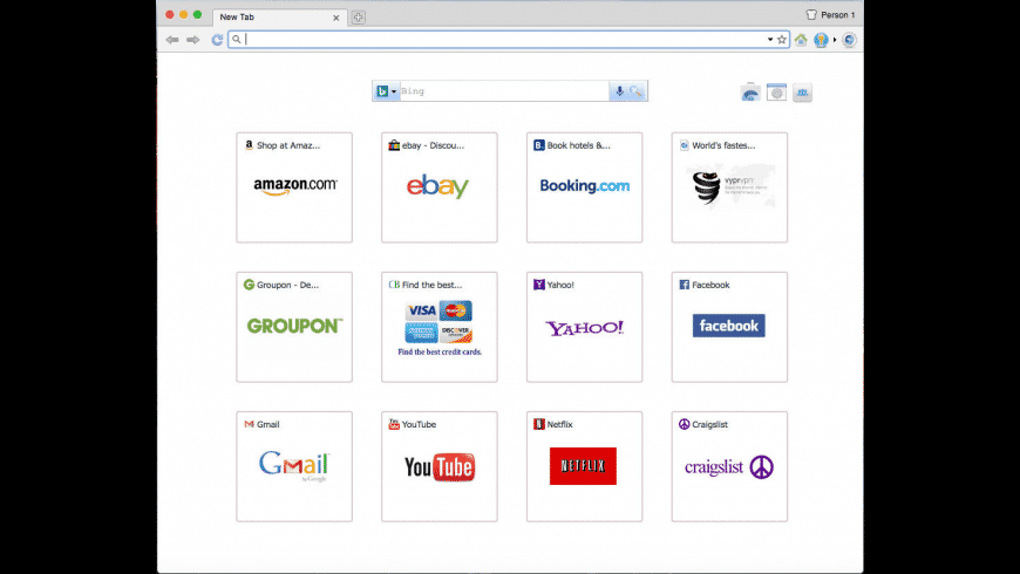
By optimizing page‑load algorithms, Slimjet can shave seconds off the time it takes to render heavy sites, a benefit that adds up for users who spend many hours online. The default home tab showcases your most‑visited sites and user‑defined shortcuts, giving you instant access to the pages you need. An intelligent autocomplete feature predicts URLs as you type, further reducing friction.
One of Slimjet’s strongest selling points is its seamless compatibility with existing Chrome extensions; you can import your favorite add‑ons directly from the Chrome Web Store, preserving the workflow you’ve already built. Beyond speed, the browser offers a deep level of customization—from toolbar arrangement to privacy settings—allowing you to craft a browsing environment that matches your personal or professional requirements. Built‑in security mechanisms automatically block phishing attempts and other online fraud, while a dedicated password manager encrypts and stores credentials for hassle‑free logins.
Whether you are a power user looking for granular control or a casual surfer who simply wants a faster, safer browsing experience, Slimjet aims to meet those needs while remaining free to download and use.
Key Features & Customization Options
- Turbo‑charged page loading – Advanced compression and pre‑fetch algorithms reduce load times on most websites.
- Chrome extension compatibility – Import and run any extension from the Chrome Web Store without additional configuration.
- Extensive UI customization – Drag‑and‑drop toolbar items, hide or show buttons, and create custom shortcut bars.
- Built‑in ad blocker – Block intrusive ads and trackers with a single click, improving both speed and privacy.
- Automatic anti‑phishing protection – Real‑time URL analysis blocks known malicious sites before they load.
- Password manager – Securely store login credentials, generate strong passwords, and auto‑fill forms.
- Download accelerator – Split files into multiple streams for faster downloads, with pause/resume capability.
- Privacy controls – Options to disable WebRTC, third‑party cookies, and fingerprinting scripts.
- Multi‑profile support – Create separate browsing profiles for work, personal, or guest use.
- Sync across devices – Optional cloud sync for bookmarks, passwords, and settings on Windows, macOS, Linux, Android, and iOS.
The feature set is deliberately arranged to serve both speed‑centric users and those who value granular control. For instance, the download accelerator can be toggled on a per‑file basis, allowing you to prioritize bandwidth for streaming while still speeding up large file transfers. The ad blocker is not a one‑size‑fits‑all solution; it offers a whitelist so you can support sites you trust while keeping unwanted content at bay.
Privacy‑focused users will appreciate the ability to turn off WebRTC and prevent IP leakage, a feature often missing from mainstream browsers. The built‑in password manager is encrypted with a master password, ensuring that even if your device is compromised, stored credentials remain inaccessible without your consent. All of these tools are accessible from a clean, modern interface that mirrors Chrome’s layout, reducing the learning curve for new users.
Installation, Setup & Daily Use Guide
Step‑by‑Step Installation
Downloading Slimjet is straightforward. Visit the official website, click the Download for Windows (or macOS/Linux) button, and save the installer file. The installer is digitally signed, ensuring a secure download free from tampering. Run the .exe (or .dmg/.sh) file and follow the on‑screen prompts: accept the license agreement, choose an installation folder, and decide whether to create a desktop shortcut. The process typically completes within two minutes on a modern PC.
Initial Configuration
Upon first launch, Slimjet presents a brief welcome wizard. Here you can import bookmarks, history, and extensions from an existing Chrome or Chromium profile, making migration painless. The wizard also asks if you’d like to enable the built‑in ad blocker and password manager. For privacy‑conscious users, you can immediately toggle the anti‑phishing shield and adjust cookie settings. The wizard concludes by prompting you to set a master password for the password manager—highly recommended for safeguarding stored credentials.
Everyday Browsing Workflow
Once configured, the home tab displays your most‑visited sites and any shortcuts you create. The address bar’s autocomplete learns from your typing habits, offering predictive suggestions after just a few uses. To customize the toolbar, right‑click on any button and select “Hide” or “Move”.
Adding a new extension is as simple as visiting the Chrome Web Store, clicking “Add to Chrome”, and confirming the installation; Slimjet handles the rest. For power users, the Settings menu (accessible via the three‑dot icon) contains advanced panels for tweaking cache size, enabling the download accelerator, and configuring proxy settings. Regular updates are delivered automatically in the background, ensuring you always have the latest security patches without manual intervention.
Overall, the installation and daily usage experience is designed to be frictionless, allowing you to focus on browsing rather than troubleshooting. Whether you are on a desktop or a mobile device, the process remains consistent, reinforcing Slimjet’s reputation as a reliable, user‑friendly browser.
Compatibility, Pros & Cons
Slimjet is available for Windows 7 and later, macOS 10.12+, major Linux distributions (Ubuntu, Fedora, Debian), as well as Android 5.0+ and iOS 11+. The cross‑platform support ensures that you can enjoy the same feature set whether you are on a desktop workstation or a mobile phone.
Pros
- Lightning‑fast page loading thanks to compression and pre‑fetching.
- Full compatibility with Chrome extensions eliminates the need to rebuild your add‑on collection.
- Highly customizable UI that adapts to individual workflows.
- Built‑in ad blocker and anti‑phishing protection enhance security and privacy.
- Secure password manager with master‑password encryption.
- Download accelerator speeds up large file transfers.
- Free to download and use, with optional paid sync for premium features.
Cons
- Resource usage can be higher than lightweight browsers like Vivaldi on low‑end hardware.
- Some advanced settings are hidden deep within menus, which may confuse novice users.
- Mobile version lags slightly behind desktop in terms of feature parity.
- No built‑in VPN; users must rely on third‑party extensions for that capability.
Frequently Asked Questions
Is Slimjet completely free or are there hidden costs?
Slimjet is free to download and use. All core features—including the ad blocker, password manager, and download accelerator—are available at no cost. A premium subscription is optional and provides cloud sync across devices, priority support, and early access to new features, but it is not required for full functionality.
Can I import my Chrome bookmarks and extensions into Slimjet?
Yes. During the initial setup wizard, Slimjet offers an import option that pulls bookmarks, history, saved passwords, and extensions directly from your existing Chrome or Chromium profile, making migration seamless.
How does Slimjet protect my privacy online?
Slimjet includes an automatic anti‑phishing filter, a built‑in ad blocker, and granular privacy settings such as disabling WebRTC, third‑party cookies, and fingerprinting scripts. You can also enable a strict tracking protection mode from the privacy panel.
Does Slimjet support Chrome extensions on mobile devices?
On Android, Slimjet can run many Chrome extensions through a special compatibility layer, though not all extensions are supported due to mobile limitations. The iOS version does not support extensions because of Apple’s App Store policies.
How often does Slimjet receive updates?
Slimjet follows a rolling release model aligned with Chromium updates, delivering security patches and feature enhancements automatically in the background. Major new versions are typically rolled out every 4‑6 weeks.
Conclusion & Call to Action
In a market crowded with browsers that promise speed and privacy, Slimjet delivers on both fronts while adding a layer of customization that is rare among free browsers. Its ability to import Chrome extensions, coupled with a robust set of built‑in tools—ad blocking, password management, and download acceleration—makes it a compelling alternative for anyone seeking a faster, more secure browsing experience without paying for premium software. Whether you are a professional who needs multiple profiles and granular privacy controls, or a casual user simply looking to shave seconds off page loads, Slimjet’s feature‑rich environment adapts to your workflow. The free price tag, regular updates, and cross‑platform availability further strengthen its value proposition. If you are ready to boost your web productivity while keeping your data safe, click the button below to download Slimjet now and start browsing at lightning speed.







